


flowkey: Learn piano
4.51.99K Reviews
App Specs
- Version
- 2.114.1
- Updated On
- License
- Free
- Downloads
- 5,000,000+
- Developer
- flowkey
- Categories
- Education
- Platform
- Android, iOS
Screenshots
 Analysis by AppCompare
If you're opening a piano-learning app for the first time, the biggest question is usually not whether you want to play, but what to do with your hands first. flowkey: Learn piano is built to make that first step feel manageable: you can explore lessons and songs, then work through music at a pace that suits your current ability. I see it as a guided practice companion, not a shortcut to becoming a pianist overnight. A small, regular routine is still what turns the screen’s instructions into confident playing.
What the app can—and cannot—do for a beginner
Flowkey is an education app from developer flowkey, and its focus is learning piano or keyboard through lessons and music rather than simply collecting theory exercises. That makes it appealing if you want a practical reason to sit at the keys: learning a melody you recognize can make practice feel less like homework. The app is free to install, has an Everyone content rating, and offers in-app purchases ranging from $15.99 to $209.99 per item. I’d explore the available learning material before deciding whether a paid option fits the way you plan to practice.
It is also worth setting expectations. An app can listen and guide you, but it cannot physically adjust your hand position or notice every source of tension the way a teacher beside you might. If you have pain, persistent uncertainty about posture, or a goal that depends on detailed musical coaching, consider getting guidance from a qualified teacher as well. Flowkey is most useful when you treat its feedback as a practice aid, not as a complete substitute for every kind of instruction.
Before your first session
Think about the instrument and the space where you will practice before you start. A keyboard or piano should be ready, with enough room to sit comfortably and see both the keys and your device. Because the app listens to your playing through the device microphone, the sound reaching it matters: choose a reasonably quiet moment, place the device where it can hear the instrument, and avoid assuming a missed note always means you played it incorrectly. Background noise or a device placed too far away can make feedback less dependable.
If you are using a keyboard with headphones, remember that the app’s microphone needs to hear the notes somehow. You may need to use the keyboard’s speaker, adjust where the phone or tablet sits, or test a short passage before committing to a longer session. A quick check can save the frustration of repeating a correct phrase because the app did not pick it up clearly. This is a practical trade-off of microphone-based feedback: it is convenient, but your room and setup become part of the learning experience.
Make the first win deliberately small
For a first session, I would not begin by trying to master a full song. Pick a short lesson or a manageable section of a piece, and use Wait Mode if you need the app to pause until you find the right notes. That gives you time to connect what you see on the screen with what your fingers are doing. Once a phrase feels comfortable, repeat it without stopping and listen for an even rhythm. That first clean passage is a better early milestone than rushing through a whole piece with uncertain timing.
A useful everyday routine might be ten quiet minutes after breakfast or before putting the keyboard away for the evening. Start by revisiting one passage that felt awkward yesterday, then move to a new section only if your hands still feel relaxed. If you are tired or distracted, shorten the session rather than turning practice into a test. The goal is to build a reliable habit and leave with one thing feeling clearer than it did when you sat down.
Worth Reading Before You Choose

EA SPORTS FC Mobile 26 Is a Bigger Football Game, but It Takes Time

Flipboard Shows What News Apps Must Do Beyond the Feed

Switching to Android Auto Means Rethinking Your Driving Routine

Google Calendar Makes a Crowded Week Easier to Manage

Ludo King Makes the Most of the Minutes Between Plans

Baby Panda World Brings Quick Play to Modern Phones, but Its Game Library Feels Busy
When feedback feels confusing
Real-time note recognition can be encouraging, but it is not the same as a person explaining why a phrase sounds uneven. If the app does not respond as expected, first check whether it can hear the instrument clearly and whether you are playing the notes shown. Then slow down, isolate a few notes, and try again. In Wait Mode, a pause can mean you need to locate a note, but it can also be a sign that the microphone has not captured the sound cleanly. Treat the signal as a clue, not a verdict on your ability.
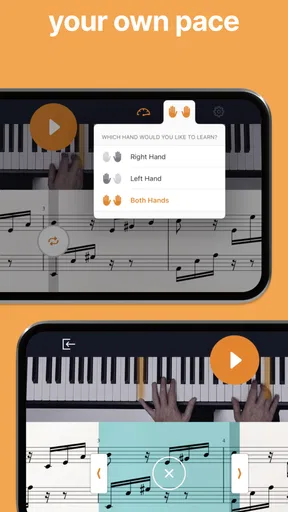
There is another common beginner snag: following notes while trying to coordinate both hands can overload your attention. Work on one hand at a time when a passage feels tangled, then bring the parts together gradually. If you already read sheet music, learning with notation may suit you; if it makes you freeze, a different learning mode may help you focus on listening and key positions first. Neither approach is universally better. The right choice is the one that lets you understand the passage without losing track of the sound you are making.
Getting Started with flowkey
First things first, setting up flowkey is a breeze. You just download the app, create an account, and you're good to go. What struck me was how intuitive the whole process was—none of those complicated sign-up procedures that make you want to toss your phone out the window. Once you're in, the app asks about your skill level, which helps tailor the content to suit your needs.
A Friendly Interface
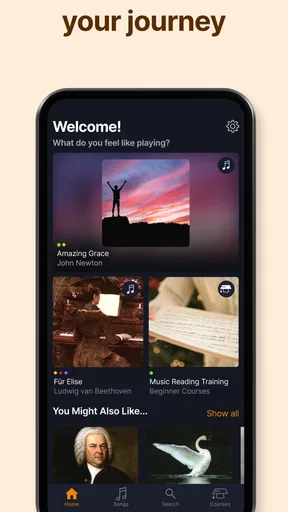
The app's design is sleek and user-friendly. The interface is clean, making it easy to navigate through various lessons and songs. There's a handy search bar if you have a specific piece in mind. I felt like I was in the driver's seat of my musical learning journey, with the app offering gentle guidance along the way.
My practical tip is to use search with a clear practice intention instead of browsing endlessly. Looking for a familiar piece can give you an inviting starting point, but a song you love may still be too demanding today. If the opening section is not approachable, switch to a lesson or an easier passage rather than treating that choice as a setback. The best first selection is not necessarily your favorite song; it is one you can return to often enough to notice progress.
Diverse Song Library
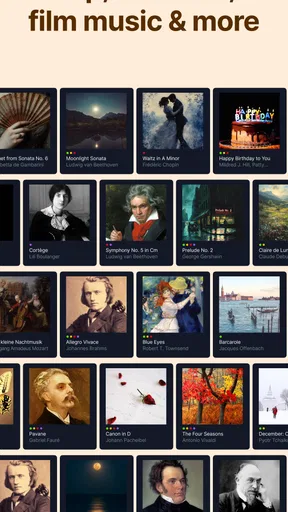
One of my favorite features is the diverse song library. From classical pieces to modern hits, there's something for everyone. I was able to switch from Beethoven to Billie Eilish in the blink of an eye. This variety keeps things fresh and exciting, and I found myself eager to practice just to tackle the next song on my list.
That variety also gives the library a useful role beyond entertainment: it can help you connect practice with a personal goal. You might work on a familiar tune to stay motivated, then spend another session on a lesson that targets a skill you need for it. I would avoid hopping between several pieces every time you sit down, though. Keeping one main piece in rotation makes it easier to remember where you left off and hear whether a difficult phrase is becoming steadier.
Interactive Lessons
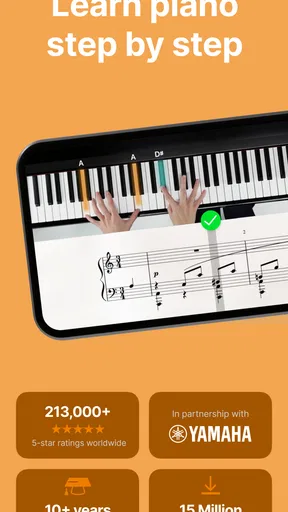
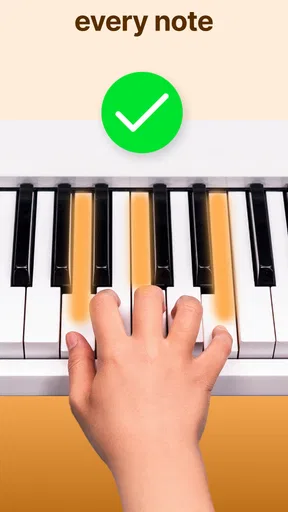
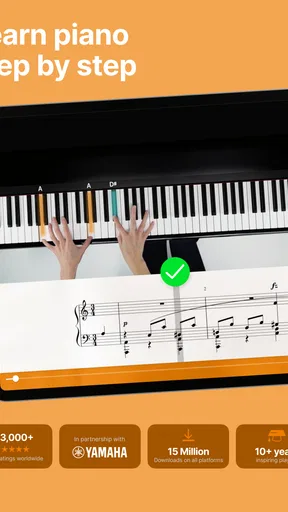
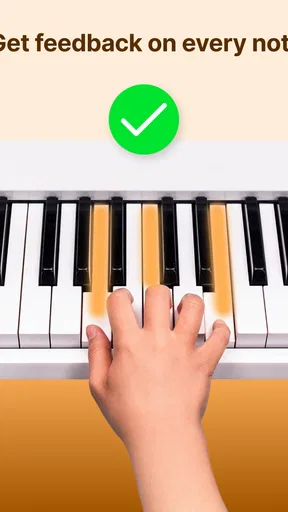
Now, let's talk about the lessons. They're interactive and well-structured, breaking down complex pieces into bite-sized sections. The app uses your device's microphone to listen to your playing and provide real-time feedback. It's like having a personal piano teacher right there with you—minus the pressure! I appreciated how the app encouraged me to slow down and focus on accuracy before speeding up.
Compared with video tutorials, that listening-and-response approach can make practice feel more active: you are not just watching someone play and hoping your hands follow. Compared with a private lesson, however, it gives less personal correction and cannot respond to the reasons behind every mistake. I would use video demonstrations when I need to see a movement or hear a complete performance, and use flowkey when I want structured repetition with feedback. The two approaches can complement each other rather than compete.
Learning Modes
flowkey offers different learning modes, which I found incredibly helpful. You can choose to learn with or without sheet music, depending on your preference. The "Wait Mode" feature was a game-changer for me. It patiently waits for you to hit the right notes before moving on, which is perfect for beginners who need a bit more time to get things right.
One trade-off is that a mode that removes pressure can also tempt you to focus only on getting each note accepted. Once you can play a section, try it again with a steadier pulse and pay attention to how the notes connect. If you have used Wait Mode for a while, switching to a more continuous run can reveal whether you have learned the musical flow or only the next key in isolation. I find that alternating between patient note-finding and uninterrupted playing gives a more honest picture of progress.
Progress Tracking
The app also tracks your progress, which is a great motivator. Seeing my improvement over time was rewarding and kept me coming back for more. Plus, there's a community aspect where you can connect with other learners, share tips, and even show off your progress. It's like having a supportive group cheering you on!
I would use progress as a nudge to return, not as a scorecard. A completed practice does not necessarily mean a passage is comfortable, and a slow session can still be valuable if you solved a fingering or rhythm problem. To make tracking useful, decide on a small personal target before you begin—such as getting through one section without losing your place—and judge the session against that target. This keeps the app’s sense of momentum connected to a skill you can actually hear.
Choosing the right learning route
Flowkey suits a first-time learner who wants a clear next action, a returning player who needs structure, or a hobbyist who is motivated by recognizable songs. It is less suited to someone who wants only free-form playing, advanced theory study, or immediate, individualized feedback on technique. If you already have a teacher, the app can still help you practice between lessons, but I would follow your teacher’s advice when it conflicts with an automated prompt.
Its current version is 2.103.0, and it has been available since January 26, 2016. The app has a 4.5 average from around 43,000 ratings, with over one million installs and around 1,900 written reviews. Those figures suggest it is an established option, but they cannot tell you whether its teaching style will click with you. I would judge that by trying a short practice session and seeing whether the lesson format helps you return to the keyboard.
Making a choice you can keep
If you are comparing learning options, think about what usually stops you from practicing. If you lose motivation without music you recognize, flowkey’s song-led approach may be more inviting than a method centered mainly on drills. If you need a teacher to correct posture, explain theory in depth, or adapt every exercise to your playing, a human instructor is the stronger choice. If you prefer learning by watching complete performances, video lessons may feel more natural, though they may not offer the same guided listening loop.
Before paying for anything, I would try to identify the kind of help you actually need: access to material, a structured route, or personal coaching. The in-app purchase range is broad, so it is sensible to check the current options and terms in the app and consider how regularly you will use them. Free access makes it possible to begin exploring without an upfront purchase, while paid content may make sense only if it supports a routine you are likely to maintain.
Final Thoughts
Overall, my experience with flowkey: Learn piano has been nothing short of fantastic. It's a well-rounded app that caters to different learning styles and skill levels. The combination of a rich song library, interactive lessons, and a user-friendly interface makes it a standout choice for anyone looking to learn piano. So, if you're ready to tickle the ivories, give flowkey a go. Who knows, you might just discover your inner maestro!
My recommendation after the first sessions
I would recommend giving it a try if you have access to a piano or keyboard and want a low-pressure way to start practicing. Go in with one modest goal, set up the device so it can hear you, and give yourself permission to repeat a short passage. That is a more reassuring route to a first success than expecting a polished performance on day one.
If you need hands-on correction, have a specific technical problem, or know you will not practice without a person keeping you accountable, choose a teacher or combine one with the app. For everyone else, the strongest reason to keep using it is that it can turn “I should learn piano someday” into a small, repeatable activity. I would start with a short session, notice whether the feedback helps, and decide from there whether its approach fits the way you learn.
Pros
- User-friendly interface for beginners.
- High-quality video tutorials available.
- Wide range of songs to learn from.
- Real-time feedback on your playing.
- Customizable learning pace.
Cons
- Requires a subscription for full access.
- Limited offline functionality.
- May have occasional app glitches.
- Not suitable for advanced pianists.
- Song library could be larger.
FAQs for flowkey: Learn piano
What is flowkey and how does it work?
Flowkey is an interactive app designed to help users learn to play the piano. It offers a combination of video tutorials and real-time feedback by listening to your playing through your device's microphone. This helps users learn at their own pace, providing instant feedback on accuracy and timing.
Is flowkey suitable for beginners?
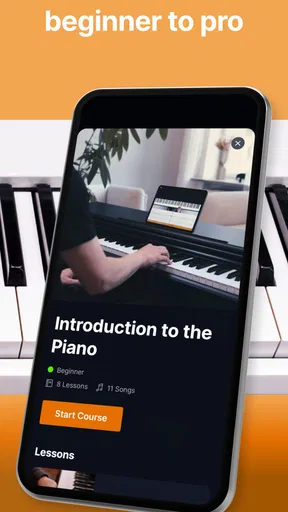
Yes, flowkey is ideal for beginners. It offers a range of lessons starting from the basics, such as finger positioning and simple melodies, progressing to more advanced pieces. The app's step-by-step approach makes it easy for beginners to follow and understand, even without prior musical knowledge.
Can flowkey be used on multiple devices?
Flowkey is compatible with a variety of devices, including Android and iOS smartphones and tablets, as well as computers. Users can access their account on multiple devices, allowing for flexibility in practice sessions. However, make sure your device's microphone is functional for the best experience.
What kind of music can I learn with flowkey?
Flowkey offers a diverse library of songs across different genres, including classical, pop, jazz, and film music. This allows users to choose pieces that match their musical interests and skill level. The app regularly updates its collection, ensuring a fresh selection of music.
Does flowkey require a subscription, and what are the costs involved?
Flowkey offers a free trial with limited access to its music library and lessons. To unlock full access, a subscription is required. Pricing varies based on the plan chosen, with options for monthly, yearly, or lifetime subscriptions. These plans offer flexibility depending on how long you plan to use the app.


